








The Incredible Power of Notion AI and 3 Ways You Should Use It!
Notion AI: The Quiet Backbone of My Planning System
A year ago, if you’d asked me what tools sat at the heart of my productivity system, Notion probably wouldn’t even have made the list.
At that point, my setup was familiar and comfortable. TickTick handled my tasks. Notes lived in a few different places. Planning my week occurred in Excel, and used a clunky Zapier automation to link to Tick Tick. It worked well enough, but like most productivity systems, it relied heavily on discipline and too much manual upkeep.
Fast forward to today, and Notion – and more specifically Notion AI – has become deeply embedded in how I plan, think, review, and execute. In fact, I’d go as far as to say it now plays a more central role in my productivity ecosystem than TickTick, which is something I genuinely never thought would happen.
This isn’t because Notion AI is flashy or clever for the sake of it. It’s because it quietly removes friction. It solves small but persistent problems. And over time, those small wins compound into a completely different way of working. At the end of the day it just works!
When it comes to AI, working can’t always be taken for granted. Chat GPT constantly leaves me frustrated. Granted, I may not be a prompt master, but with Notion AI, you genuinely don’t have to be. It just seems to know what I want, however I describe it.
Notion AI as More Than “Just” Note‑Taking
Most people first encounter Notion AI through note‑taking, and rightly so. It’s excellent at it.
Meeting notes are a perfect example. I’ll often start a meeting with nothing more than a rough heading and a few bullet points. By the time the call ends, I can ask Notion AI to clean up the notes, summarise key points, extract action items, or rewrite everything into a concise, structured summary.
That alone saves time, but more importantly, it changes behaviour. I’m more likely to capture notes properly because I know I don’t need to make them perfect in the moment. I can focus on listening and thinking, and let Notion AI handle the refinement afterwards.
The same applies to personal notes, project thinking, and planning documents. Brain dumps no longer feel messy or overwhelming because I know I can return later and have Notion AI turn chaos into clarity.
But note‑taking is really just the surface layer.
Where Notion AI has genuinely surprised me is how powerful it becomes when you move beyond writing and into systems.
Using Notion AI to Solve Real Automation Problems
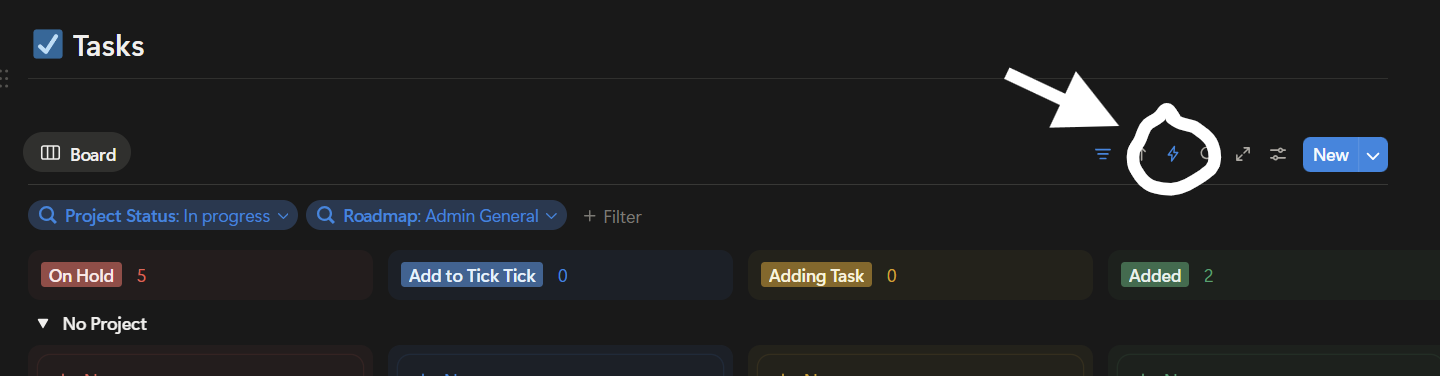
Notion Automation
One of my long‑standing frustrations in Notion was something deceptively simple: setting start and end dates of a date property to the current time in a notion template.
I wanted database templates that would set a start date and end date to “now” when I created a new page. Not when the template was created. Not when I last edited it. But at the moment the page itself came into existence.
If you’ve spent any time in Notion, you may know you can use the shortcut today() or now() to automatically set the date to the current time. However, this then removes the end date of that data property. For a long time, this felt like a limitation I just had to accept.
Enter Notion AI.
Rather than Googling endlessly or piecing together half‑solutions, I explained the problem directly to Notion AI inside my workspace. I described what I wanted to achieve, the structure of my database, and the behaviour I was aiming for.
What I got back wasn’t just an explanation, but a clear, step‑by‑step approach to building an automation that solved the issue.
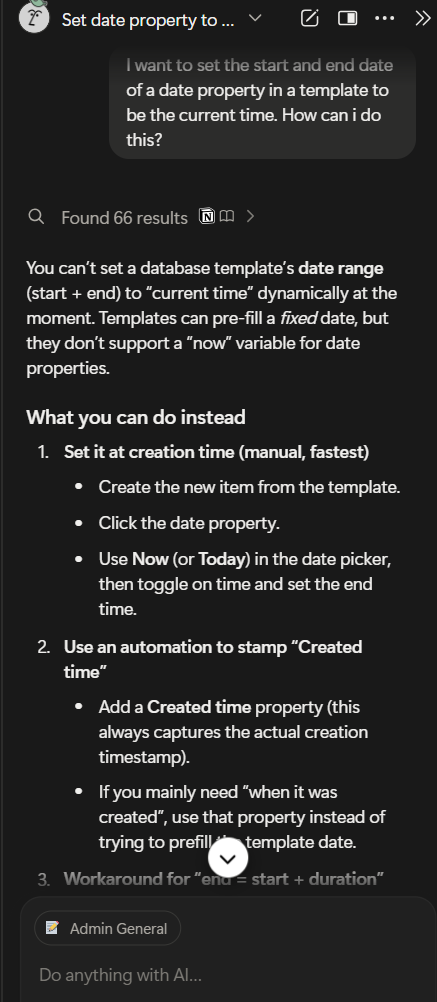
Notion AI advice
Using Notion’s automations alongside AI‑generated logic, I now have a system where:
- A page is created in a database
- The start date is automatically set to the current time and rounded to the nearest hour
- The end date is calculated correctly based on rules I’ve defined
No manual adjustments. No broken templates. No friction.
This might sound like a small thing, but these are exactly the kinds of details that make or break a planning system. When dates are wrong, trust in the system erodes. When things “just work”, you’re far more likely to rely on them.
Notion AI didn’t just help me understand the problem – it helped me design the solution.
When you create a formula in notion, there is an AI prompt box where you ask what you want to achieve with the formula. I have now used this a few times. Each and every time, Notion has filled the formula out for me and it has worked seamlessly.
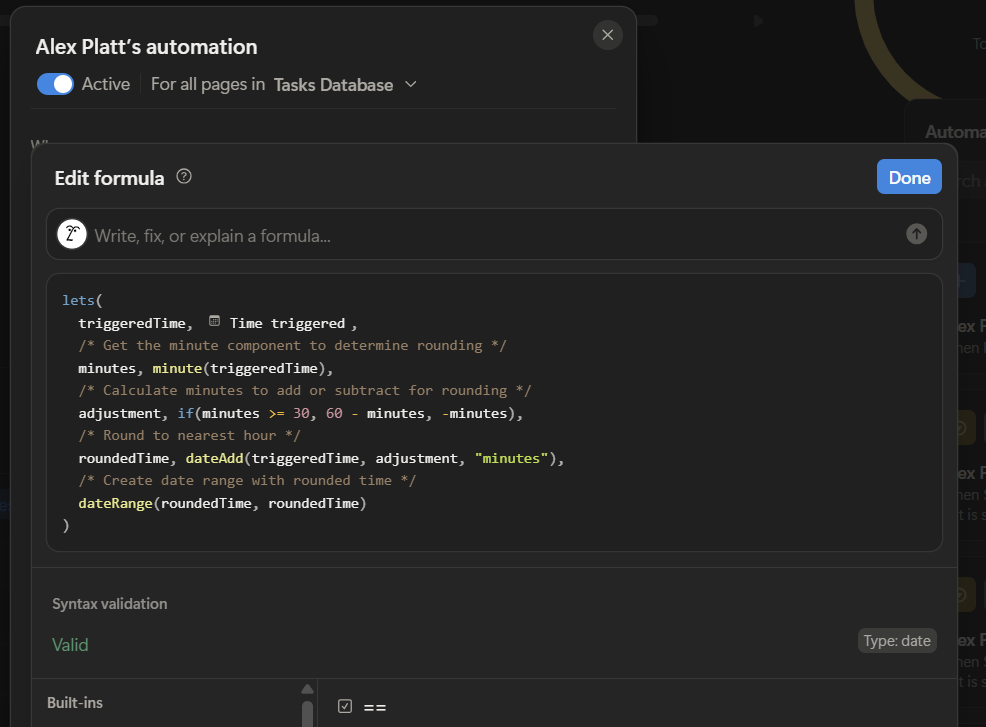
Notion AI Formula
You can even iterate. I asked notion to keep the current formula but enhance it and it did just that. Props to notion. I don’t even feel like I’m automating. I have absolutely no affiliation with Notion, and it’s not cheap – but in this case you seem to get what you pay for.
Automations That Feel Like a Thinking Partner
That experience changed how I see Notion AI.
I no longer think of it as a writing assistant. I think of it as a thinking partner inside my workspace.
When I’m designing a new database, refining a workflow, or trying to make a system more intentional, I’ll often explain what I’m trying to achieve and ask Notion AI how it would approach it.
Sometimes that results in formulas. Sometimes it’s automation logic. Sometimes it’s simply a better way of structuring information. Either way, it dramatically shortens the distance between idea and execution.
This is especially powerful because it happens in context. Notion AI understands the content of your pages, the structure of your databases, and the language you already use. That makes its suggestions far more relevant than generic advice pulled from elsewhere. Like I say Chat GPT was not able to help me in this instance.
Meeting Notes, Summaries, and Organisational Memory
Another area where Notion AI shines is in summarising and pulling together information from across your workspace.
As your Notion setup grows, information inevitably becomes more distributed. Meeting notes live in one place. Project updates in another. Goals somewhere else entirely.
Notion AI is remarkably good at bridging those gaps.
I can ask it to summarise a project based on multiple linked pages. I can ask it to pull out decisions made across several meetings. I can even use it to reflect patterns back to me – recurring issues, repeated themes, or areas that need attention.
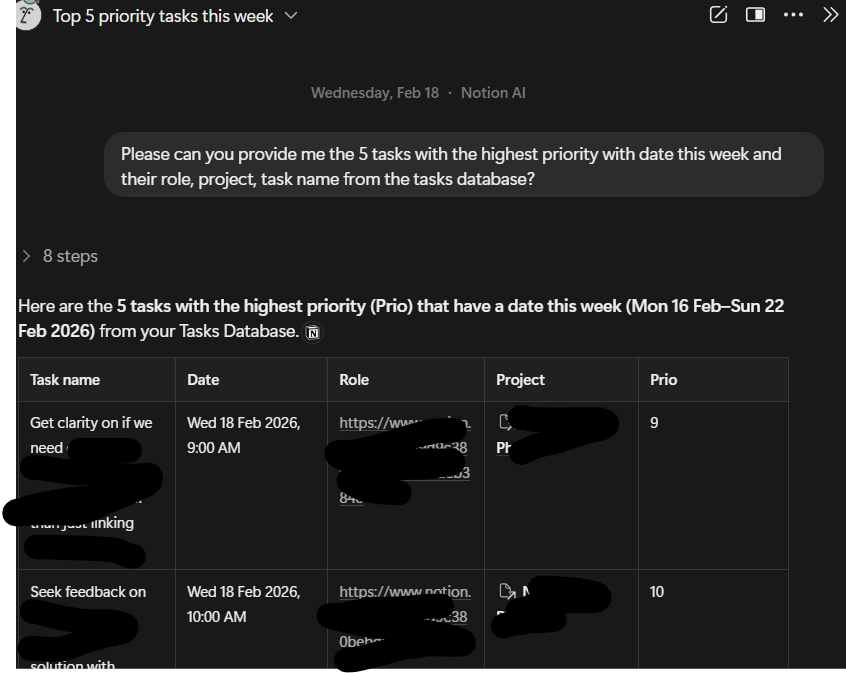
Notion AI Summary
This turns Notion into something closer to an organisational memory rather than just a storage system. Information doesn’t just sit there waiting to be found; it becomes actively useful again.
For planning and review, this is invaluable. Weekly and monthly reviews become faster and more insightful because the raw thinking has already been distilled.
From Roles to Goals: A Shift in How I Plan
Perhaps the biggest change Notion – and Notion AI in particular – has enabled is a shift in how I plan my time.
Previously, most of my tasks flowed from roles. Work role. Personal role. Admin role. The question was usually, “What do I need to do because of the roles I have?”
Now, my planning starts somewhere else entirely.
It starts with goals.
Because Notion makes it so easy to link goals, projects, and tasks – and because Notion AI helps maintain and summarise those links – I’m far more intentional about creating tasks from outcomes I want to achieve.
This has completely transformed how I plan my week. Instead of reacting to task lists, I’m actively choosing what deserves attention based on longer‑term direction.
Notion AI plays a subtle but important role here. It helps break goals into projects. It helps turn vague intentions into concrete next actions. It helps review progress in a way that feels strategic rather than overwhelming.
The result is a system that supports thinking, not just doing.
More Embedded Than I Ever Expected
What still surprises me most is just how embedded Notion has become in such a short space of time.
A year ago, I barely used it. Today, it underpins:
- My weekly planning
- My meeting notes and summaries
- My goal tracking
- My project management
- My reflections and reviews
And thanks to Notion AI, maintaining that system doesn’t feel like work. It feels supportive.
TickTick is still part of my setup, and I still value it highly. But I genuinely wouldn’t have believed you if you’d told me Notion would one day rival it in importance. Yet here we are.
Final Thoughts
Notion AI isn’t magic. It won’t fix a broken planning philosophy or create clarity where there is none.
But in a well‑thought‑out system, it’s incredibly powerful.
It reduces friction. It removes busywork. It helps you think more clearly, plan more strategically, and trust your system more deeply.
For me, it’s been the difference between using a productivity tool and building a productivity ecosystem.
And that’s a shift worth paying attention to.